TO_BINARY_DOUBLE
Syntax
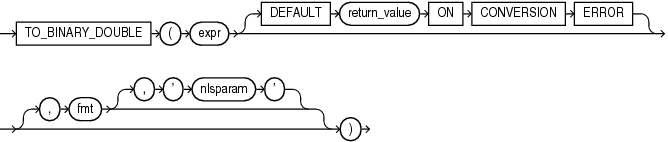
Purpose
TO_BINARY_DOUBLE converts expr to a double-precision floating-point number.
-
exprcan be any expression that evaluates to a character string of typeCHAR,VARCHAR2,NCHAR, orNVARCHAR2, a numeric value of typeNUMBER,BINARY_FLOAT, orBINARY_DOUBLE, or null. IfexprisBINARY_DOUBLE, then the function returnsexpr. Ifexprevaluates to null, then the function returns null. Otherwise, the function convertsexprto aBINARY_DOUBLEvalue. -
The optional
DEFAULTreturn_valueONCONVERSIONERRORclause allows you to specify the value returned by this function if an error occurs while convertingexprtoBINARY_DOUBLE. This clause has no effect if an error occurs while evaluatingexpr. Thereturn_valuecan be an expression or a bind variable, and must evaluate to a character string of typeCHAR,VARCHAR2,NCHAR, orNVARCHAR2, a numeric value of typeNUMBER,BINARY_FLOAT, orBINARY_DOUBLE, or null. The function convertsreturn_valuetoBINARY_DOUBLEin the same way it convertsexprtoBINARY_DOUBLE. Ifreturn_valuecannot be converted toBINARY_DOUBLE, then the function returns an error. -
The optional '
fmt' and 'nlsparam' arguments serve the same purpose as for theTO_NUMBERfunction. If you specify these arguments, thenexprandreturn_value, if specified, must each be a character string or null. If either is a character string, then the function uses thefmtandnlsparamarguments to convert the character string to aBINARY_DOUBLEvalue.
If expr or return_value evaluate to the following character strings, then the function converts them as follows:
-
The case-insensitive string '
INF' is converted to positive infinity. -
The case-insensitive string '-
INF' is converted to negative identity. -
The case-insensitive string '
NaN' is converted toNaN(not a number).
You cannot use a floating-point number format element (F, f, D, or d) in a character string expr.
Conversions from character strings or NUMBER to BINARY_DOUBLE can be inexact, because the NUMBER and character types use decimal precision to represent the numeric value, and BINARY_DOUBLE uses binary precision.
Conversions from BINARY_FLOAT to BINARY_DOUBLE are exact.
See Also:
Examples
The examples that follow are based on a table with three columns, each with a different numeric data type:
CREATE TABLE float_point_demo
  (dec_num NUMBER(10,2), bin_double BINARY_DOUBLE, bin_float BINARY_FLOAT);

INSERT INTO float_point_demo
  VALUES (1234.56,1234.56,1234.56);

SELECT * FROM float_point_demo;

   DEC_NUM BIN_DOUBLE  BIN_FLOAT
---------- ---------- ----------
   1234.56 1.235E+003 1.235E+003
The following example converts a value of data type NUMBER to a value of data type BINARY_DOUBLE:
SELECT dec_num, TO_BINARY_DOUBLE(dec_num)
  FROM float_point_demo;

   DEC_NUM TO_BINARY_DOUBLE(DEC_NUM)
---------- -------------------------
   1234.56                1.235E+003
The following example compares extracted dump information from the dec_num and bin_double columns:
SELECT DUMP(dec_num) "Decimal",
   DUMP(bin_double) "Double"
   FROM float_point_demo;

Decimal                     Double
--------------------------- ---------------------------------------------
Typ=2 Len=4: 194,13,35,57   Typ=101 Len=8: 192,147,74,61,112,163,215,10
The following example returns the default value of 0 because the specified expression cannot be converted to a BINARY_DOUBLE value:
SELECT TO_BINARY_DOUBLE('2oo' DEFAULT 0 ON CONVERSION ERROR) "Value"
  FROM DUAL;

     Value
----------
         0