D Oracle XML Developer's Kit JavaBeans (Deprecated)
A description is given of Oracle XML Developer's Kit (XDK) JavaBeans, which is deprecated.
Note:
The XDK JavaBeans, described in this appendix, and the corresponding XDK Java application programming interface (API) packages and classes are deprecated in Oracle Database 12c Release 1 (12.1). These components are still supported in Oracle Database 12c Release 1 (12.1), but Oracle recommends not using them in new applications. This functionality is deprecated with no replacement.
Topics:
See Also:
Oracle Database XML Java API Reference for more information about the deprecated XDK Java APIs
D.1 Introduction to XDK JavaBeans
XDK JavaBeans are a set of Extensible Markup Language (XML) components that you can use in Java applications and applets.
Topics:
D.1.1 Prerequisites for Using XDK JavaBeans
Prerequisites for using XDK JavaBeans are described.
This appendix assumes that you are familiar with these technologies:
-
JavaBeans. JavaBeans components, or Beans, are reusable software components that can be manipulated visually in a builder tool.
-
Java Database Connectivity (JDBC). Database connectivity is included with the XDK JavaBeans. The beans can connect directly to a JDBC-enabled database to retrieve and store XML and Extensible Stylesheet Language (XSL) files.
-
Document Object Model (DOM). DOM is an in-memory tree representation of the structure of an XML document.
-
Simple API for XML (SAX). SAX is a standard for event-based XML parsing.
-
XML Schema language. See Using the XML Schema Processor for Java for an overview and links to suggested reading.
D.1.2 Standards and Specifications for XDK JavaBeans
XDK JavaBeans require version 1.2 or later of XDK, and they can be used with any version of JDK 1.2 or above. The XDK JavaBeans conform with the Sun JavaBeans specification, and include the required BeanInfo class that extends java.beans.SimpleBeanInfo.
The JavaBeans 1.01 specification, which describes JavaBeans as present in JDK 1.1, is available here: http://www.oracle.com/technetwork/java/index.html
The additions for the Java 2 platform to the JavaBeans core specification provide developers with standard means to create more sophisticated JavaBeans components. The JavaBeans specifications for Java 2 are also available here: http://www.oracle.com/technetwork/java/index.html
See Also:
Oracle XML Developer's Kit Standards for a summary of the standards supported by XDK
D.1.3 XDK JavaBeans Features
XDK JavaBeans facilitate the addition of graphical user interfaces (GUIs) to XML applications. Bean encapsulation includes documentation and descriptors that you can access directly from Java integrated development environments (IDEs) such as Oracle JDeveloper.
XDK includes these beans:
D.1.3.1 DOMBuilder
The oracle.xml.async.DOMBuilder bean constructs a DOM tree from an XML document. The DOMBuilder JavaBean encapsulates the XML parser for class DOMParser with a bean interface and supports asynchronous parsing. By registering a listener, Java programs can initiate parsing of large or multiple documents and immediately return control to the caller.
A main benefit of this bean is increased efficiency when parsing multiple files, especially if the files are large. DOMBuilder can also provide asynchronous parsing in a background thread in interactive visual applications. Without asynchronous parsing, the GUI is useless until the document to be parsed. With DOMBuilder, the application invokes the parse method and then resumes control. The application can display a progress bar, allow the user to cancel the parse, and so forth.
D.1.3.2 XSLTransformer
The oracle.xml.async.XSLTransformer JavaBean supports asynchronous transformation. It accepts an XML document, applies an Extensible Stylesheet Language Transformation (XSLT) stylesheet, and creates an output file. It lets you transform an XML document to almost any text-based format, including XML, HTML, and data definition language (DDL).
This bean can also be used as the basis of a server-side application or servlet to render an XML document, such as an XML representation of a query result, into HTML for display in a browser.
The main benefit of the XSLTransformer bean is that it can transform multiple files in parallel. Like DOMBuilder, you can also use it in visual applications to avoid long periods of time when the GUI is nonresponsive. By implementing the XSLTransformerListener interface, the invoking application receives notification when the transformation completes.
D.1.3.3 DBAccess
The oracle.xml.dbaccess.DBAccess bean maintains character large object (CLOB) tables that contain multiple XML and text documents.
You can use it to store and retrieve XML documents in the database, but not to process them within the database. Java applications that use the DBAccess bean connect to the database through JDBC. XML documents stored in CLOB tables that are not of type XMLType do not have their entities expanded.
The DBAccess bean enables you to do perform these tasks:
-
Create and delete tables of type
CLOB. -
Query the contents of
CLOBtables. -
Perform
INSERT,UPDATE, andDELETEoperations on XML documents stored inCLOBtables.
D.1.3.4 XMLDBAccess
The oracle.xml.xmldbaccess.XMLDBAccess bean extends the DBAccess bean to support XML documents stored in XMLType tables. The class provides methods to list, delete, or retrieve XMLType instances and their tables. For example, the getXMLXPathTextData() method retrieves the value of an XPath expression from an XML document.
DBAccess JavaBean maintains XMLType tables that can hold multiple XML and text documents. Each XML or text document is stored as a row in the table. The table is created with this structured query language (SQL) statement:
CREATE TABLE (FILENAME   CHAR( ) UNIQUE,
              FILEDATA   SYS.XMLType);
The FILENAME field holds a unique string used as a key to retrieve, update, or delete the row. Document text is stored in the FILEDATA field.
The XMLDBAccess bean performs these tasks:
-
Creates and deletes
XMLTypetables -
Lists the contents of an
XMLTypecolumn -
Performs
INSERT,UPDATE, andDELETEoperations on XML documents stored inXMLTypetables
D.1.3.5 XMLDiff
When comparing XML documents, it is usually unhelpful to compare them character by character. Most XML comparisons are concerned with differences in structure and significant textual content, not differences in white space.
The oracle.xml.differ.XMLDiff bean performs these tasks:
-
Constructs and compares the DOM trees for two input XML documents and indicates whether the documents are different.
-
Provides a graphical display of the differences between two XML files. Specifically, you can refer to node insert, delete, modify, or move.
-
Generates an XSLT stylesheet that can convert one of the input XML documents into the other document.
The XMLDiff bean is especially useful in pipeline applications. For example, an application could update an XML document, compare it with a previous version of the document, and store the XSLT stylesheet that shows the differences between them.
D.1.3.6 XMLCompress
The Oracle XML parser includes a compressor that can serialize XML document objects as binary streams.
This is explained in Compressing and Decompressing XML. Although a useful tool, compression with XML parser has these disadvantages:
-
When XML data is deserialized, it must be reparsed.
-
The encapsulation of XML data in tags greatly increase its size.
The oracle.xml.xmlcomp.XMLCompress bean is an encapsulation of the XML compression functionality. It provides these advantages when serializing and deserializing XML:
-
It encapsulates the method that serializes the DOM, which produces a stream.
-
XML processors can regenerate the DOM from the compressed stream without reparsing the XML.
The bean supports compression and decompression of input XML parsed by DOMParser or SAXParser. DOM compression supports inputs of type XMLType, CLOB, and BLOB.
To use different parsing options, parse the document before input and then pass the XMLDocument object to the compressor bean. The compression factor is a rough value based on the file size of the input XML file and the compressed file. The limitation of the compression factor method is that it can be used only when the compression is performed with java.io.File objects as parameters.
D.1.3.7 XSDValidator
The oracle.xml.schemavalidator.XSDValidator bean encapsulates the XSDValidator class and adds capabilities for validating a DOM tree.
A useful feature of this bean concerns validation errors. If the application throws a validation error, method getStackList() returns a list of DOM tree paths that lead to the invalid node. Nodes with errors are returned in a vector of stack trees in which the top element of the stack represents the root node. You can get child nodes by pulling them from the stack. To use getStackList() you must use instantiate the java.util.Vector and java.util.Stack classes.
D.2 Using XDK JavaBeans: Overview
Topics here include basic use of JavaBeans and running the demo programs.
Topics:
D.2.1 Using XDK JavaBeans: Basic Process
The program flow of Java applications that use the more useful beans is described. These include DOMBuilder, XSLTransformer, XMLDBAccess, and XMLDiff.
D.2.1.1 Using the DOMBuilder JavaBean: Basic Process
Class DOMBuilder implements an XML 1.0 parser according to the World Wide Web Consortium (W3C) recommendation. It parses an XML document and builds a DOM tree. The parsing is done in a separate thread. Interface DOMBuilderListener must be used for notification when the tree is built.
When developing applications that use this bean, you must import these subpackages:
-
oracle.xml.async, which provides asynchronous Java beans for DOM building -
oracle.xml.parser.v2, which provides APIs for SAX, DOM, and XSLT
Subpackage oracle.xml.parser.v2 is described in XML Parsing for Java. The most important DOM-related classes and interfaces in the javax.xml.async package are described in Table D-1.
Table D-1 javax.xml.async DOM-Related Classes and Interfaces
| Class/Interface | Description |
|---|---|
|
|
Encapsulates an XML parser to parse an XML document and build a DOM tree. The parsing is done in a separate thread. The |
|
|
Instantiates the event object that |
|
|
Must be implemented so that the program can receive notifications about events during the asynchronous parsing. The class implementing this interface must be added to the |
|
|
Defines the error event that is sent when parse exception occurs. |
|
|
Must be implemented so that the program can receive notifications when errors are found during parsing. The class implementing this interface must be added to the |
Figure D-1 depicts the basic process of an application that uses the DOMBuilder JavaBean.
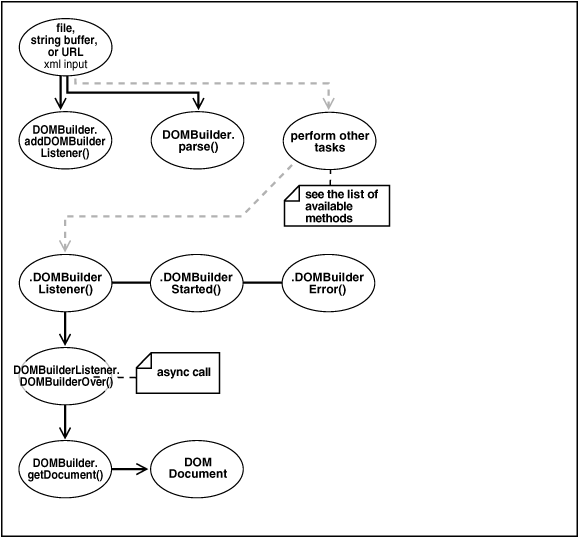
Figure D-1 shows these stages of XML processing:
D.2.1.2 Using the XSLTransformer JavaBean: Basic Process
The XSLTransformer bean encapsulates the Java XML parser XSLT processing engine with a bean interface and extends its functionality to permit asynchronous transformation. By registering a listener, your Java application can transform large and successive documents by having the control returned immediately to the caller.
When developing applications that use this bean, you must import these subpackages:
-
oracle.xml.async, which provides asynchronous Java beans for XSL transformations -
oracle.xml.parser.v2, which provides APIs for XML parsing SAX, DOM, and XSLT
The oracle.xml.parser.v2 subpackage is described in detail in XML Parsing for Java. The most important XSL-related classes and interfaces in the javax.xml.async package are described in Table D-2.
Table D-2 javax.xml.async XSL-Related Classes and Interfaces
| Class/Interface | Description |
|---|---|
|
|
Applies XSL transformation in a background thread. |
|
|
Represents the event object used by |
|
|
Must be implemented so that the program can receive notifications about events during asynchronous transformation. The class implementing this interface must be added to the |
|
|
Instantiates the error event object that |
|
|
Must be implemented so that the program can receive notifications about error events during the asynchronous transformation. The class implementing this interface must be added to the |
Figure D-2 shows XSLTransformer bean usage.
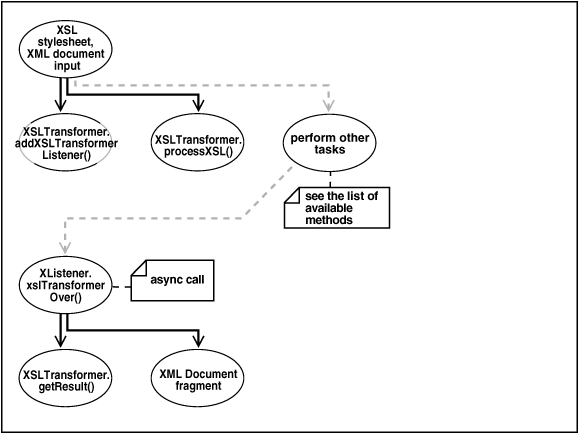
Figure D-2 goes through these stages:
- Input an XSLT stylesheet and XML instance document.
- Add an XSLT listener. The program invokes the
XSLTransfomer.addXSLTransformerListener()method. - Apply the stylesheets. The
XSLTransfomer.processXSL()method initiates the XSL transformation in the background. - Optionally, perform further processing with the
XSLTransformerbean. - Invoke the XSLT listener when the program receives an asynchronous call. The listener, which must implement the
XSLTransformerListenerinterface, is called by invoking thexslTransformerOver()method. - Fetch the result of the transformation. Invoke the
XSLTransformer.getResult()method to return the XML document fragment for the resulting document. - Output the XML document fragment.
D.2.1.3 Using the XMLDBAccess JavaBean: Basic Process
Basic use of the XMLDBAccess bean is described.
When developing applications that use the XMLDBAccess bean, you must use these subpackages:
-
oracle.xml.xmldbaccess, which includes theXMLDBAccessbean -
oracle.xml.parser.v2, which provides APIs for XML parsing SAX, DOM, and XSLT
The oracle.xml.parser.v2 subpackage is described in detail in XML Parsing for Java. Some of the more important methods in the XMLDBAccess class are described in Table D-3.
Table D-3 XMLDBAccess Methods
| Class/Interface | Description |
|---|---|
|
|
Creates an |
|
|
Inserts a text file as a row in an |
|
|
Replaces a text file as a row in an |
|
|
Retrieves all XML tables with names starting with a specified string. |
|
|
Retrieves text file from an |
|
|
Retrieves the text data based on the XPath expression from an |
Figure D-3 shows typical XMLDBAccess bean usage. It shows how the DBAccess bean maintains and manipulates XML documents stored in XMLTypes.
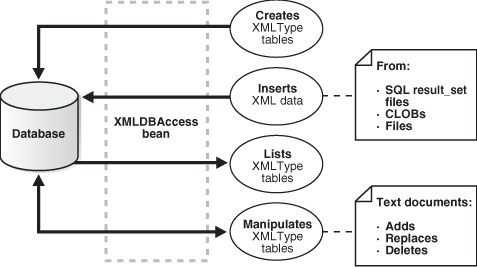
For example, an XMLDBAaccess program could process XML documents in these stages:
- Create an
XMLTypetable. InvokecreateXMLTypeTable()by passing it database connection information and a table name. - List the
XMLTypetables. InvokegetXMLTypeTableNames()by passing it database connection information and an empty string. - Load XML data into the table. Invoke
replaceXMLTypeData()by passing it database connection information, the table name, the XML file name, and a string containing the XML. - Retrieve the XML data into a
String. InvokegetXMLTypeData()by passing it the connection information, the table name, and the XML file name. - Retrieve XML data based on an XPath expression. Invoke
getXMLXPathTextData()by passing it the connection information, the table name, the XML file name, and the XPath expression. - Close the connection.
D.2.1.4 Using the XMLDiff JavaBean: Basic Process
Basic use of the XMLDiff bean is described.
When developing applications that use the XMLDiff bean, you typically use these subpackages:
-
oracle.xml.xmldiff, which includes theXMLDiffbean -
oracle.xml.parser.v2, which provides APIs for XML parsing SAX, DOM, and XSLT -
oracle.xml.async, which provides asynchronous Java beans for DOM building
Subpackage oracle.xml.parser.v2 is described in detail in XML Parsing for Java. Some important methods in class XMLDiff are described in Table D-4.
Table D-4 XMLDiff Methods
| Class/Interface | Description |
|---|---|
|
|
Determines the differences between two input XML files or two XMLDocument objects. |
|
|
Generates an XSL file that represents the differences between the input two XML files. The first XML file can be transformed into the second XML file with the generated stylesheet. If the XML files are the same, then the XSL generated can transform the first XML file into the second XML file, where the first and second files are equivalent. Related methods are |
|
|
Sets the XML files to be compared. |
|
|
Gets the document root as an |
|
|
Gets the text panel as |
Figure D-4 shows typical XMLDiff bean usage. It shows how XMLDiff bean compares and displays the differences between input XML documents.
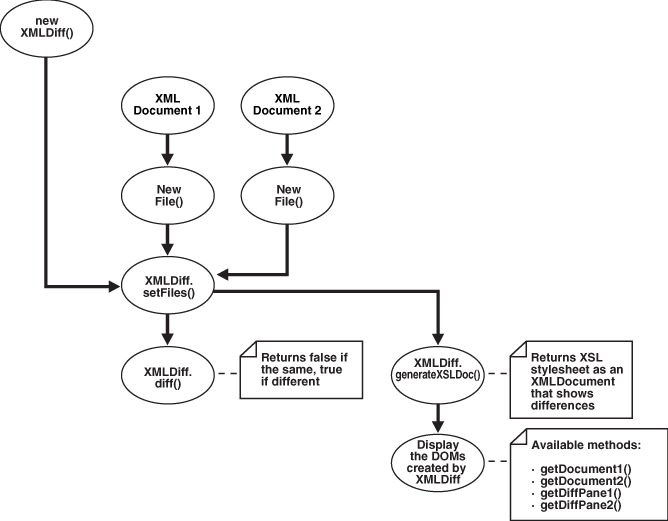
For example, an XMLDiff program could process XML documents in these stages:
- Create an
XMLDiffobject. - Set the files to be compared. Create
Fileobjects for the input files and pass references to the objects toXMLDiff.setFiles(). - Compare the documents. The
diff()method returnsfalseif the XML files are the same andtrueif they are different. - Respond depending on the whether the input XML documents are the same or different. For example, if they are the same, invoke
JOptionPane.showMessageDialog()to print a message. - Generate an XSLT stylesheet that shows the differences between the input XML documents. For example,
generateXSLDoc()generates an XSL stylesheet as anXMLDocument. - Display the DOM trees created by
XMLDiff.
D.2.2 Running XDK JavaBean Demo Programs
Demo programs for XDK SJavaBeans are included in directory $ORACLE_HOME/xdk/demo/java/transviewer.
The demos show the use of the XDK beans described in XDK JavaBeans Features, and also some visual beans that are now deprecated. The beans used in the demos are:
-
XSLTransformer -
DOMBuilder -
DBAccess -
XMLDBAccess -
XMLDiff -
XMLCompress -
XSDValidator -
oracle.xml.srcviewer.XMLSourceView(deprecated) -
oracle.xml.treeviewer.XMLTreeView(deprecated) -
oracle.xml.transformer.XMLTransformPanel(deprecated) -
oracle.xml.dbviewer.DBViewer(deprecated)
Although the visual beans are deprecated, they remain useful as educational tools. Consequently, the deprecated beans are included in $ORACLE_HOME/lib/xmldemo.jar. The nondeprecated beans are included in $ORACLE_HOME/lib/xml.jar.
Table D-5 lists the sample programs provided in the demo directory. The first column of the table indicates which sample program use deprecated beans.
Table D-5 JavaBean Sample Java Source Files
| Sample | File Name | Description |
|---|---|---|
|
(deprecated) |
|
A visual application that uses the See also Running sample1 |
|
(deprecated) |
|
A sample visual application that uses the See also Running sample2 |
|
|
|
A nonvisual application that uses the See also Running sample3 |
|
(deprecated) |
|
A visual application that uses the See also Running sample4 |
|
(deprecated) |
|
This |
|
(deprecated) |
|
This |
|
|
|
A nonvisual application for the To use See also Running sample5 |
|
(deprecated) |
|
A visual application that uses the See also Running sample6 |
|
(deprecated) |
|
A class that implements the |
|
(deprecated) |
|
A |
|
(deprecated) |
|
A visual application that uses the See also Running sample7 |
|
(deprecated) |
|
A simple class that pipes information from the GUI to the bean. This class is used in |
|
(deprecated) |
|
A |
|
(deprecated) |
|
A |
|
(deprecated) |
|
A |
|
(deprecated) |
|
A visual application that uses the See also Running sample8 |
|
(deprecated) |
|
A |
|
(deprecated) |
|
A visual application that uses the See also Running sample9 |
|
(deprecated) |
|
A class that shows how to use the |
|
|
|
An application that shows how to use the See also Running sample10 |
Table D-6 describes additional files that are used by the demo programs.
Table D-6 JavaBean Sample Files
| File Name | Description |
|---|---|
|
|
An XML document used by the |
|
|
An XML document used by the |
|
|
An XML document for use by |
|
|
An XML document used by |
|
|
An XML document for use by |
|
|
An XSLT stylesheet for use by |
|
|
An XSLT stylesheet for use by |
|
|
A sample XML document for use in |
|
|
An XML document used by the |
|
|
An XML schema document used by the |
Documentation for how to compile and run the sample programs is located in the README in the same directory. The basic steps are:
D.2.2.1 Running sample1
Sample1 is the program that uses the XMLTransViewer bean.
You can run the program manually:
java XMLTransformPanelSample
You can use the program to import and export XML files from Oracle Database, store XSL transformation files in the database, and apply stylesheets to XML interactively. To use the database connectivity feature in this program, you must know the network name of the computer where the database runs, the port (usually 1521), and the name of the Oracle instance (usually orcl). You also need an account with CREATE TABLE privileges. If you have installed the sample schemas, then you can use the account hr. You can the XMLTransViewer program to apply stylesheet transformation to XML files and display the result.The program displays a panel with tabs on the top and the bottom. You can use the first two top tabs to switch between the XML buffer and the XSLT buffer. The third tab performs XSL transformation on the XML buffer and displays the result. You can use the first two tabs on the bottom to load and save data from Oracle Database and from the file system. The remaining bottom tabs switch the display of the current content to tree view, XML source, edit mode and, in case of the result view after the transformation, HTML.
D.2.2.2 Running sample2
Sample2 is a GUI-based demo for the XMLSourceView and XMLTreeView beans, which are deprecated. The ViewSample program displays the booklist.xml file in separate source and tree views.
You can run the program manually:
java ViewSample
D.2.2.3 Running sample3
Sample3 is a nonvisual demo for the asynchronous DOMBuilder and XSLTransformer beans. The AsyncTransformSample program applies the doc.xsl XSLT stylesheet to all *.xml files in the current directory. The program writes output to files with the extension .log.
You can run the program manually:
java AsyncTransformSample
D.2.2.4 Running sample4
Sample4 is a visual demo for the DBViewer bean, which is deprecated.
It runs in these stages:
JDBC connection information is hard-coded in the DBViewClaims.java source file, which implements a class used by the demo. Specifically, the program assumes the values for USERID, PASSWORD, and so forth set in the Makefile. If your configuration is different, navigate to line 92 in DBViewClaims.java and modify setUsername(), setPassword(), and so forth with values that reflect your Oracle Database configuration.
D.2.2.5 Running sample5
Sample5 is a nonvisual demo for the XMLDBAccess bean. It uses the XMLType objects to store XML documents inside the database. The following program connects to the database with the Java thin client, creates XMLType tables, and loads the data from booklist.xml.
To run the program you must specify these pieces of information as command-line arguments:
-
Host name (for example,
myhost) -
Port number (for example,
1521) -
SID of the database (for example,
ORCL) -
Database account in which the tables are created (for example,
hr) -
Password for the database account (for example,
hr)
For example, you can run the program:
java XMLDBAccessSample myhost 1521 ORCL hr hr
The following text shows sample output from dbaccess.log:
Demo for createXMLTypeTables():
Table +'testxmltype' successfully created.

Demo for listXMLTypeTables():
tablenamename=TESTXMLTYPE

Demo for replaceXMLTypeData() (similar to insert):
XML Data from +'booklist.xml' successfully replaced in table 'testxmltype'.

Demo for getXMLTypeData():
XMLType data fetched:
<?xml version="1.0"?>
<booklist>
  <book isbn="1234-123456-1234">
    <title>C Programming Language</title>
    <author>Kernighan and Ritchie</author>
    <publisher>EEE</publisher>
    <price>7.99</price>
  </book>
...
  <book isbn="1230-23498-2349879">
    <title>Emperor's New Mind</title>
    <author>Roger Penrose</author>
    <publisher>Oxford Publishing Company</publisher>
    <price>15.99</price>
  </book>
</booklist>

Demo for getXMLTypeXPathTextData():
Data fetched using XPath exp '/booklist/book[3]':
<book isbn="2137-598354-65978">
  <title>Twelve Red Herrings</title>
  <author>Jeffrey Archer</author>
  <publisher>Harper Collins</publisher>
  <price>12.95</price>
</book>
D.2.2.6 Running sample6
The sample6 program is a visual demo for the XMLDiff bean.
The XMLDiffSample class invokes a GUI that enables you to choose the input data files from the File menu by selecting Compare XML Files. The Transform menu enables you to apply the generated XSLT generated to the first input XML. Select Save As in the File menu to save the output XML file, which is the same as the second input file. By default, the program compares XMLDiffData1.txt to XMLDiffData2.txt and stores the XSLT output as XMLDiffSample.xsl.
You can run the program manually:
java -mx50m XMLDiffSample XMLDiffData1.txt XMLDiffData2.txt
If the input XML files use a DTD that accesses a URL outside a firewall, then modify XMLDiffSample.java to include the proxy server settings before the setFiles() invocation. For example, modify the program as follows:
/* Set proxy to access dtd through firewall */
Properties p = System.getProperties();
p.put("proxyHost", "www.proxyservername.com");
p.put("proxyPort", "80");
p.put("proxySet", "true");
/* You will also have to import java.util.*; */
D.2.2.7 Running sample7
The sample7 visual demo shows the use of the XMLCompress bean. Class compviewer invokes a GUI that lets the user compress and uncompress XML files and data obtained from the database. The loading options let the user retrieve the data from a file system or a database.
This application does not support loading and saving compressed data from the database. The compression factor indicates a rough estimate by which the XML data is reduced.
You can run the program manually:
java compviewer
D.2.2.8 Running sample8
The sample8 demo uses the XMLTreeViewer bean. The XMLSchemaTreeViewer program lets a user view an XMLDocument in a tree format. The user can input an XML-schema document and validate an instance document against the schema. If the document is invalid, invalid nodes are highlighted with an error message.
Also, the program displays a log of all the line information in a separate panel, which enables the user to edit the instance document and revaluated. Test the program with sample files purchaseorder.xml and purchaseorder.xsd. The instance document purchaseorder.xml does not conform to the schema defined in purchaseorder.xsd.
You can run the program manually:
java XMLSchemaTreeViewer
D.2.2.9 Running sample9
The sample9 demo uses the SourceViewer bean. The XMLSrcViewer program lets you view an XML document or a DTD, with syntax highlighting. You can validate the document against an input XML schema or DTD. The DTD can be internal or external.
If the validation is successful, then you can view the instance document and XML schema or DTD in the Source View pane. If errors were encountered during schema validation, then an error log with line numbers is available in the Error pane. The Source View pane shows the XML document with error nodes highlighted.You can use sample files purchaseorder.xml and purchaseorder.xsd for testing XML schema validation with errors. You can use note_in_dtd.xml with DTD validation mode to view an internal DTD with validation errors. You can run the program manually:
java XMLSrcViewer
D.2.2.10 Running sample10
The sample10 demo shows the use of the XSDValidator bean.
The XSDValidatorSample program's two input arguments are an XML document and its associated XML schema. The program displays errors occurring during validation, including line numbers.
The following program uses purchaseorder.xsd to validate the contents of purchaseorder.xml:
java XSDValidatorSample purchaseorder.xml purchaseorder.xsd
The XML document fails (intentionally) to validate against the schema. The program displays these errors:
Sample purchaseorder.xml purchaseorder.xsd
<Line 2, Column 41>: XML-24523: (Error) Invalid value 'abc' for attribute: 'orderDate'
#document->purchaseOrder
<Line 7, Column 27>: XML-24525: (Error) Invalid text 'CA' in element: 'state'
#document->purchaseOrder->shipTo->state->#text
<Line 8, Column 25>: XML-24525: (Error) Invalid text 'sd' in element: 'zip'
#document->purchaseOrder->shipTo->zip->#text
<Line 14, Column 27>: XML-24525: (Error) Invalid text 'PA' in element: 'state'
#document->purchaseOrder->billTo->state->#text
<Line 17, Column 22>: XML-24534: (Error) Element 'coment' not expected.
#document->purchaseOrder->coment
<Line 29, Column 31>: XML-24534: (Error) Element 'shipDae' not expected.
#document->purchaseOrder->items->item->shipDae
D.3 Processing XML with XDK JavaBeans
Topics here include processing XML documents asynchronously using the DOMBuilder and XSLTransformer beans, and comparing XML documents using the XmlDiff bean.
Topics:
D.3.1 Processing XML Asynchronously with the DOMBuilder and XSLTransformer Beans
You can use XDK JavaBeans to perform asynchronous XML processing.
This is explained in XSLTransformer.
The AsyncTransformSample.java program shows how to use the DOMBuilder and XSLTransformer beans. The program implements these methods:
-
runDOMBuilders() -
runXSLTransformer() -
saveResult() -
makeXSLDocument() -
createURL() -
init() -
exitWithError() -
asyncTransform()
The basic architecture of the program is:
-
The program declares and initializes the fields used by the class. The input XSLT stylesheet is hard-coded in the program as
doc.xsl. The class defines these fields:String basedir = new String ("."); OutputStream errors = System.err; Vector xmlfiles = new Vector(); int numXMLDocs = 1; String xslFile = new String ("doc.xsl"); URL xslURL; XMLDocument xsldoc -
The
main()method invokes theinit()method to perform the initial setup. This method lists the files in the current directory, and if it finds files that end in the extension.xml, it adds them to aVectorobject. The implementation for theinit()method is:boolean init () throws Exception { File directory = new File (basedir); String[] dirfiles = directory.list(); for (int j = 0; j < dirfiles.length; j++) { String dirfile = dirfiles[j]; if (!dirfile.endsWith(".xml")) continue; xmlfiles.addElement(dirfile); } if (xmlfiles.isEmpty()) { System.out.println("No files in directory were selected for processing"); return false; } numXMLDocs = xmlfiles.size(); return true; } -
The
main()method instantiatesAsyncTransformSample:AsyncTransformSample inst = new AsyncTransformSample();
-
The
main()method invokes theasyncTransform()method. TheasyncTransform()method performs these main tasks:-
Invokes
makeXSLDocument()to parse the input XSLT stylesheet. -
Invokes
runDOMBuilders()to initiate parsing of the instance documents, that is, the documents to be transformed, and then transforms them.
After initiating the XML processing, the program resumes control and waits while the processing occurs in the background. When the last request completes, the method exits.
The following code shows the implementation of the
asyncTransform()method:void asyncTransform () throws Exception { System.err.println (numXMLDocs + " XML documents will be transformed" + " using XSLT stylesheet specified in " + xslFile + " with " + numXMLDocs + " threads"); makeXSLDocument (); runDOMBuilders (); // wait for the last request to complete while (rm.activeFound()) Thread.sleep(100); } -
D.3.1.1 Parsing the Input XSLT Stylesheet
Parsing an XSLT stylesheet is described.
Method makeXSLDocument() performs a simple DOM parse of a stylesheet. It does not use asynchronous parsing. The technique is the same as that described in Performing Basic DOM Parsing.
The method follows these steps:
D.3.1.2 Processing the XML Documents Asynchronously
Method runDOMBuilders() shows how you can use the DOMBuilder and XSLTransformer beans to perform asynchronous processing. The parsing and transforming of the XML data occurs in the background.
The method follows these steps:
D.3.1.2.1 Transforming the XML with the XSLTransformer Bean
When a DOM parse completes, the DOM listener receives notification. Method domBuilderOver() implements response behavior for this event. The program passes the DOM to method runXSLTransformer(), which initiates XSL transformation.
The method follows these steps:
D.3.2 Comparing XML Documents with the XMLDiff JavaBean
You can use XDK JavaBeans to compare the structure and significant content of XML documents.
This is explained in XMLDiff,
The XMLDiffSample.java program shows how to use the XMLDiff bean. The program implements these methods:
-
showDiffs() -
doXSLTransform() -
createURL()
The basic architecture of the program is:
-
The program declares and initializes the fields used by the class. One field is of type
XMLDiffFrame, which is the class implemented in theXMLDiffFrame.javademo. The class defines these fields:protected XMLDocument doc1; /* DOM tree for first file */ protected XMLDocument doc2; /* DOM tree for second file */ protected static XMLDiffFrame diffFrame; /* GUI frame */ protected static XMLDiffSample dfxApp; /* XMLDiff sample application */ protected static XMLDiff xmlDiff; /* XML diff object */ protected static XMLDocument xslDoc; /* parsed xsl file */ protected static String outFile = new String("XMLDiffSample.xsl"); /* output xsl file name */ -
The
main()method creates anXMLDiffSampleobject:dfxApp = new XMLDiffSample();
-
The
main()method adds and initializes aJFrameto display the output of the comparison. The following code shows this technique:diffFrame = new XMLDiffFrame(dfxApp); diffFrame.addTransformMenu();
-
The
main()method instantiates theXMLDiffbean. The following code shows this technique:xmlDiff = new XMLDiff();
-
The
main()method invokes theshowDiffs()method. This method performs these tasks:-
Invokes
XMLDiff.diff()to compare the input XML documents. -
Generates and displays an XSLT stylsheet that can transform one input document into the other document.
The following code fragment shows the
showDiffs()method invocation:if (args.length == 3) outFile = args[2]; if(args.length >= 2) dfxApp.showDiffs(new File(args[0]), new File(args[1])); diffFrame.setVisible(true);
-
D.3.2.1 Comparing the XML Files and Generating a Stylesheet
Method showDiffs() shows the use of the XMLDiff bean.
The method follows these steps:
-
Set the files for the
XMLDiffprocessor. The following statement shows this technique:xmlDiff.setFiles(file1, file2);
-
Compare the files. The
diff()method returns a boolean value that indicates whether the input documents have identical structure and content. If they are equivalent, then the method prints a message to theJFrameimplemented by theXMLDiffFrameclass. The following code fragment shows this technique:if(!xmlDiff.diff()) { JOptionPane.showMessageDialog ( diffFrame, "Files are equivalent in XML representation", "XMLDiffSample Message", JOptionPane.PLAIN_MESSAGE ); } -
Generate a DOM for the XSLT stylesheet that shows the differences between the two documents. The following code fragment shows this technique:
xslDoc = xmlDiff.generateXSLDoc();
-
Display the documents in the
JFrameimplemented byXMLDiffFrame.XMLDiffFrameinstantiates theXMLSourceViewbean, which is deprecated. The method follows these steps:-
Create the source pane for the input documents. Pass the DOM handles of the two documents to the
diffFrameobject to make the source pane:diffFrame.makeSrcPane(xmlDiff.getDocument1(), xmlDiff.getDocument2());
-
Create the pane that shows the differences between the documents. Pass references to the text panes to
diffFrame:diffFrame.makeDiffSrcPane(new XMLDiffSrcView(xmlDiff.getDiffPane1()), new XMLDiffSrcView(xmlDiff.getDiffPane2())); -
Create the pane for the XSLT stylesheet. Pass the DOM of the stylesheet:
diffFrame.makeXslPane(xslDoc, "Diff XSL Script");
diffFrame.makeXslTabbedPane();
-