Named Cursor Attribute
Every named cursor (explicit cursor or cursor variable) has four attributes, each of which returns information about the execution of a DML statement.
Note:
You can use cursor attributes only in procedural statements, not in SQL statements.
Topics
Syntax
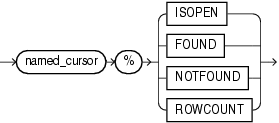
named_cursor_attribute ::=
named_cursor ::=
Semantics
named_cursor_attribute
%ISOPEN
named_cursor%ISOPEN has the value TRUE if the cursor is open, and FALSE if it is not open.
%FOUND
named_cursor%FOUND has one of these values:
-
If the cursor is not open,
INVALID_CURSOR -
If cursor is open but no fetch was tried,
NULL. -
If the most recent fetch returned a row,
TRUE. -
If the most recent fetch did not return a row,
FALSE.
%NOTFOUND
named_cursor%NOTFOUND has one of these values:
-
If cursor is not open,
INVALID_CURSOR. -
If cursor is open but no fetch was tried,
NULL. -
If the most recent fetch returned a row,
FALSE. -
If the most recent fetch did not return a row,
TRUE.
%ROWCOUNT
named_cursor%ROWCOUNT has one of these values:
-
If cursor is not open,
INVALID_CURSOR. -
If cursor is open, the number of rows fetched so far.
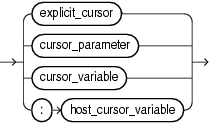
named_cursor
explicit_cursor
Name of an explicit cursor.
cursor_parameter
Name of a formal cursor parameter.
cursor_variable
Name of a cursor variable.
:host_cursor_variable
Name of a cursor variable that was declared in a PL/SQL host environment and passed to PL/SQL as a bind variable. Do not put space between the colon (:) and host_cursor_variable.
Examples
-
Example 6-14, "%ISOPEN Explicit Cursor Attribute"
-
Example 6-15, "%FOUND Explicit Cursor Attribute"
-
Example 6-16, "%NOTFOUND Explicit Cursor Attribute"
-
Example 6-17, "%ROWCOUNT Explicit Cursor Attribute"
Related Topics
In this chapter:
In other chapters: